FACSPy.pl.pca_samplewise#
- FACSPy.pl.pca_samplewise(adata, gate, layer, color=None, data_group='sample_ID', data_metric='mfi', color_scale='linear', cmap=None, vmin=None, vmax=None, figsize=(3, 3), return_dataframe=False, return_fig=False, ax=None, show=True, save=None, **kwargs)#
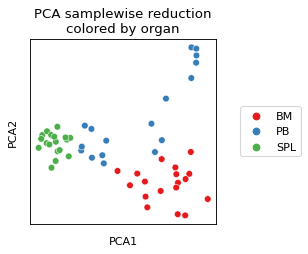
Plot for visualizing sample-wise dimensionality reduction (PCA) as a scatter plot.
- Parameters:
adata (
AnnData) – The anndata object of shape n_obs x n_vars where rows correspond to cells and columns to the channelsgate (
str) – The gate to be analyzed, called by the population name. This parameter has a default stored in fp.settings, but can be superseded by the user.layer (
str) – The layer corresponding to the data matrix. Similar to the gate parameter, it has a default stored in fp.settings which can be overwritten by user input.color (
Optional[str]) – The parameter that controls the coloring of the plot. Can be set to categorical variables from the .obs slot or continuous variables corresponding to channels. Default is set to density, which calculates the point density in the plot.data_group (
str) – Sets the groupby parameter that was used for samplewise dimred calculation. Using this value, the correct dataframe is extracted from adata.uns. Defaults to sample_ID.data_metric (
Literal['mfi','fop']) – Sets the data metric that was used for dimensionality reduction calculation. Can be one of mfi or fop.color_scale (
Literal['biex','log','linear']) – Sets the scale for the colorbar. Has to be one of biex, log, linear.cmap (
Optional[str]) – Sets the colormap for plotting. Can be continuous or categorical, depending on the input data. When set, both seaborns palette and cmap parameters will use this value.vmin (
Optional[float]) – Minimum value to plot in the color vector.vmax (
Optional[float]) – Maximum value to plot in the color vector.figsize (
tuple[float,float]) – Contains the dimensions of the final figure as a tuple of two ints or floats.return_dataframe (
bool) – If set to True, returns the raw data that are used for plotting as a dataframe.return_fig (
bool) – If set to True, the figure is returned.ax (
Optional[Axes]) – AAxescreated from matplotlib to plot into.show (
bool) – Whether to show the figure. Defaults to True.save (
Optional[str]) – Expects a file path including the file name. Saves the figure to the indicated path. Defaults to None.kwargs – keyword arguments ultimately passed to sns.scatterplot.
- Return type:
Optional[Figure,Axes,DataFrame]]- Returns:
If show==False a
AxesIf return_fig==True a
FigureIf return_dataframe==True a
DataFramecontaining the data used for plotting
Examples
import FACSPy as fp

dataset = fp.mouse_lineages()

fp.tl.mfi(dataset, layer = "transformed")
fp.tl.pca_samplewise(dataset, layer = "transformed")

fp.pl.pca_samplewise(
    dataset,
    gate = "CD45+",
    layer = "transformed",
    color = "organ"
)